TikTok Stories are designed to be temporary. That makes timing important: a URL that works now may stop resolving after the Story expires, the creator removes it, or the audience changes. The safest approach is to save your own original before publishing and treat someone else's Story as view-only unless you have permission.
When a Story is genuinely public and downloadable, use its direct share link while it is still active. Do not rely on an old chat preview, and never use a service that asks for account credentials to reach private Stories.
Quick Answer
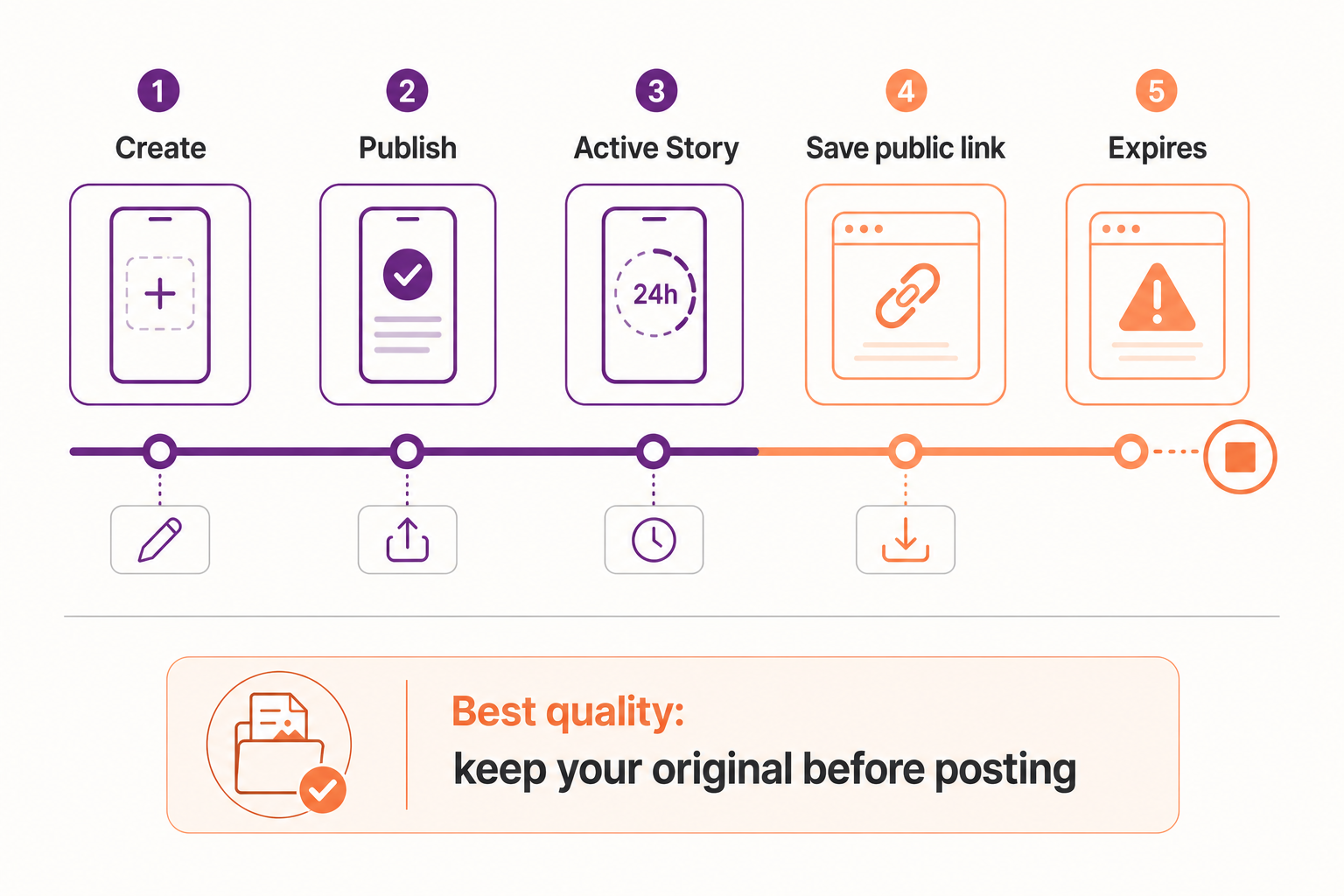
For your own Story, keep the original file or enable device saving before posting. For an eligible public Story, open it while active, copy the direct share link, verify that it loads without your TikTok session, and process the URL promptly. Once the source expires or becomes private, a public downloader cannot recover it.
Before You Start
Before changing several settings at once, determine whether the issue belongs to one piece of media or to every TikTok request. The first two clues in this case are the source has a short lifetime and audience settings can change. Testing a second known public item creates a useful control: if it works, focus on the original source, its URL, and its audience instead of reinstalling unrelated software.
Use one controlled workflow and record what changes. Begin with preserve your original: If the Story is yours, save the edited source to the device before posting. This gives you the best quality and avoids any dependency on expiration. Then change only one variable, such as the browser, connection, or copied link. This prevents a temporary success from being mistaken for a permanent fix and makes any support report far more useful.
Why Story Downloads Are Time-Sensitive
The source has a short lifetime
Stories are temporary by design. After expiration, the media URL or post page may no longer be available to public visitors.
Audience settings can change
A creator can limit who sees a Story or remove it early. A link copied while public may later require account access.
Story links can be indirect
Share sheets and messages sometimes provide a profile or preview link instead of a stable address for the exact Story.
Screen recording sacrifices quality
Recording captures interface elements, notifications, display scaling, and playback compression rather than the clean source media.
How to Save a TikTok Story
- Preserve your original
If the Story is yours, save the edited source to the device before posting. This gives you the best quality and avoids any dependency on expiration. - Open the active Story
Navigate to the exact Story, confirm that it plays completely, and check that it is intended for a public audience. - Copy the direct share link
Use the Story's Share control. Paste the result into a browser to ensure it opens the same item rather than only the creator's profile. - Verify public access
Test the link in a private window. If the Story cannot be viewed there, do not attempt to bypass the audience setting. - Process and save promptly
Paste the eligible public URL into SaveFlow, choose the best available MP4, and confirm that the saved file plays from beginning to end.
Story-Saving Best Practices
Act before expiration
Processing an active public Story is more reliable than trying an old URL after it has disappeared.
Name the file clearly
Use a date and short description so temporary posts remain organized in your library.
Avoid notification overlays
A direct file is cleaner than a screen recording that may capture private alerts.
Ask before reposting
Temporary visibility is not permission to publish the Story elsewhere.
Device-Specific Notes
iPhone and iPad
Use current Safari or another updated browser, check Photos permissions when a file must enter the library, and inspect the Files app when it does not appear in Photos. Keep the browser in the foreground until a large TikTok file finishes.
Android
Check the Downloads folder, browser download permission, free storage, and battery-saving rules. Some Android versions pause a background browser aggressively, so complete the request before switching apps.
Windows, macOS, and Chromebook
Use an updated mainstream browser and confirm the configured download location. Browser extensions, managed-network filters, and VPN software are easier to test in a private window or a clean browser profile.
How to Verify the Saved File
- Open the local file: Disconnect from the result page and play the saved item from local storage. This proves the download is complete rather than a temporary streamed preview.
- Check the important properties: Confirm duration, dimensions, file type, audio, and the final seconds. For this topic, also remember the practical advice to act before expiration.
- Compare with the source: Review the beginning, a motion-heavy middle section, and the ending. Missing slides, silent audio, abrupt endings, or a very small file can reveal an incomplete or lower-quality result.
- Respect the boundary: The first hard limit is expired or deleted stories. Delete unintended copies and retain the media only when your ownership, permission, or lawful use is clear.
Important Story Limitations
Expired or deleted Stories
Public tools cannot restore a source that no longer exists or is no longer exposed.
Friends-only and private Stories
Access controls must remain intact, even if someone sends you a link.
Music availability
Licensed audio may be limited by region or omitted from certain source variants.
Responsible use: Temporary content still belongs to its creator. Save your own Stories freely, but obtain permission before retaining or redistributing another person's public Story.
Frequently Asked Questions
Can I download a TikTok Story after it expires?
Usually not from the public source. If it was your Story, check your original files or any archive feature available in your account.
Will the creator know I downloaded a public Story?
Platform behavior changes, and third-party processing should never be treated as invisible. Respect the creator's expectations regardless of notification behavior.
Why did the saved Story lose music?
The available public media variant may not include licensed audio in your region, or the sound may have been removed from the source.
Final Takeaway
With temporary content, prevention beats recovery. Keep the original of your own Story, verify public access before processing someone else's, and save an eligible file while the source is active. Once a Story expires or becomes restricted, respect that boundary.